
Follow the instructions below to complete your enrollment successfully.
Step 1
Click “Enroll Now”
Begin your enrollment by clicking the
“Enroll Now” button on our website.
Complete the enrollment form by answering all required questions.
Make sure that the information you provide is accurate and complete.

During the enrollment process, you will be asked to:
- Enter your personal information.
- Answer all required enrollment questions.
- Review and agree to the school’s policies.
- Upload all required documents.
- Review your information before submitting.
- Submit your completed enrollment application.
Please make sure that all required fields are completed and that
your uploaded documents are clear, readable, and in the required format
before submitting your enrollment.
Step 2
Complete and Submit Your Enrollment
After answering all questions, agreeing to the required policies,
and uploading all required documents, carefully review your application.
Once you have confirmed that all information is correct,
submit your enrollment application.
Step 3
Go to the Login Page
After you have successfully completed and submitted your enrollment,
proceed to the school’s Login Page.
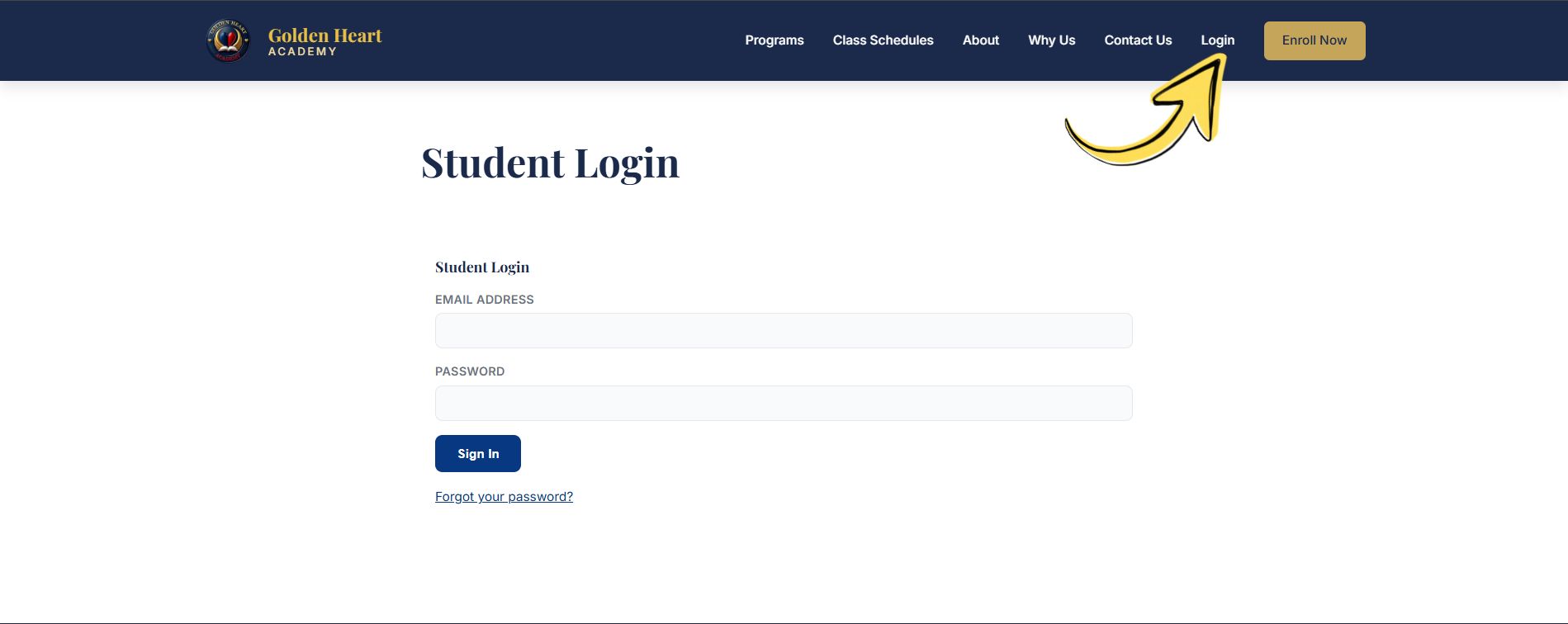
Use the login credentials provided to you or the credentials
you created during the enrollment process.
Step 4
Log In to Your Student Account
Enter your username/email address and password to access your
student account.
Once logged in, you can access the information and resources
available to you as an enrolled student.
Keep your login credentials secure and do not share your password
with anyone.